February 25th, 2026
New

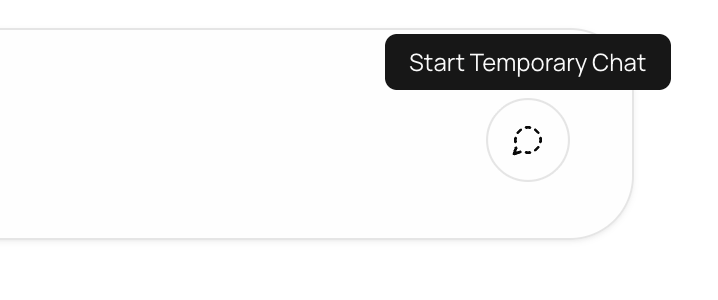
You can now start a Temporary Chat for conversations that shouldnβt be saved.
When Temporary Chat is turned on:
The conversation is not saved to your inbox
Nothing is stored in personal memory
Nothing is stored in team memory
The chat is permanently deleted once you leave
This gives you a private, disposable space for sensitive discussions, quick drafts, or one-off conversations that donβt need to live in your workspace.
To use it, simply toggle on Temporary Chat while in a conversation on top right. Once you exit, the entire chat is erased and cannot be recovered.
Your conversations, your control.
February 19th, 2026
New

You can now sign in or sign up using a Passkey: a faster, easier way to access your account.
A passkey lets you log in without a password and two factor authentication but equally secure.
Just use what you already use to unlock your device - like Touch ID, Face ID, or your screen lock.
No passwords to remember, log in or sign up smoothly.
No Two Factor Authentication needed, but equally secure.
Click Sign in with Passkey on the login page
Click Sign up with Passkey on the sign-up page
Follow the easy steps on your screen
You can also set it up anytime in:
Account Settings - Security - Two Factor Authentication - Set up Passkey
Log in with just a touch or a glance.
January 29th, 2026
New

Saved Prompts let you store frequently used messages and reuse them anytime with just one click. Save a prompt once and use it again anytime
Click the Saved Prompts icon in the message box
Select New Prompt
Add a title and your prompt text
Choose whether to share it with your team
Click Save
Access prompts via the Saved Prompts icon or the slash command
π‘ If you already typed a message in the message box, you can save it directly, no need to copy-paste.
Saves time
Avoids repeating the same messages
Keeps your best prompts always ready
January 20th, 2026
New

To help you access everything easily on 913.ai, weβve introduced the Quick Actions Menu - a fast and easy way to search and access everything on the platform from one place. You can find features, chats, records, projects, folders, settings, help articles and updates, all without switching tabs or navigating through multiple menus.
You can open Quick Actions from Settings (bottom-left) or by simply pressing Shift + Q.
Weβve also added keyboard shortcuts for common actions like attaching a file (Cmd/Cntrl+Shift+U), New Session (Cmd/Ctrl + Shift + S) and for smoother navigation across menus (Contacts: Cmd/Cntrl+ 3). Simply hover over any menu or feature to see its available shortcut alongside its name in the label.
Try Quick Actions today to move faster, discover more, and never miss anything on 913.ai. π
January 5th, 2026

Weβre excited to introduce Folders on 913.ai β a new way to organize and use your files more efficiently.
With Folders, you can upload and manage all your files in one place, keep everything neatly organized, and easily use those files as context across your chats and agents for better, more accurate results.
π Learn more in the Folders Guide
This update makes working with files simpler, faster, and more powerful β all in one place.
December 22nd, 2025
New

913.ai is excited to launch Record Groups, a brand-new system, First-of-its-kind that redefines how customer and crew operations are managed.
Record Groups introduce a new AI-driven system for managing customers, crew, and cases end to end. Data flows into records automatically through agents, uploads, or connected sources, where AI agents continuously process it β analyzing information, taking actions, and generating results in the background.
Each record gives you full visibility into this process through dedicated sections for activity, results, documents, photos, emails, calls, notes, and details, so you can monitor every step the agent takes.
You can interact with the agent at any point β ask why a decision was made, question a result, discuss a document or photo, or request the agent to take further action.
At the same time, records remain fully flexible: agents can generate notes and updates automatically, while you can also add notes, upload files, log activity, and edit or customize record details manually. The system combines continuous AI automation with complete human control, all in one unified record.
With Record Groups, you can operate at scale, gain real-time visibility, and manage entire workflows across claims, contracts, employees, customers, crew, or cases β powered end-to-end by AI.
This isnβt just a feature. Itβs a shift in how modern operations are run.
Learn more about Record Groups here π Record Groups: A Complete Guide
November 28th, 2025

We are thrilled to announce the launch of the 913.ai Outlook Add-in, bringing the full power of your AI Agents directly into your inbox. No more switching apps. No more copy and paste. Your AI Agents now works right inside Outlook, helping you read, summarize and respond to emails faster than ever.
Download it here now: 913.ai Outlook Add-in
Install the 913.ai Add-in in Outlook from Microsoft Marketplace
Select any email and open the add-in
Log in with your 913.ai account
Ask the agent to summarize, analyze or draft a response
Insert the result into your email with one click or copy it manually
Smooth, fast and fully integrated into your daily email workflow.
For a detailed guide on how to install and use the 913.ai Outlook Add-in, click here: 913.ai Outlook Add-in Help Guide
November 19th, 2025
New

Your most requested feature has officially arrived.
We are thrilled to announce the launch of the 913.ai Word Add-in, bringing the full power of your AI agents directly into Microsoft Word. No more switching tabs. No more copy and paste. Your AI now works right inside your document, exactly where you need it.
Install the 913.ai Add-in in Word
Log in with your 913.ai account
Chat with agents directly beside your document
Select the text to ask, rewrite, summarize or improve
Insert the result into Word with one click
Quick, smooth and fully integrated into your writing flow.
For a more detailed help guide on How to Install & Use 913.ai Word Add-in, Click here: MS Word Add-in Help Guide
November 14th, 2025

We have updated your dashboard to give you better insights and a more engaging experience.
You can now see how much time you have saved using the AI Agent.
View your most used AI Agent at a glance.
Track your total interactions with the AI Agent.
A new leaderboard lets you compete with your team and see who has the most interactions with AI Agents.
Helpful articles and resources.
The latest updates and announcements.
Enjoy exploring the improved dashboard and get more out of your AI powered learning experience.
October 31st, 2025
New

You can now share your thoughts, report issues, or give feedback on any agentβs response - all in just one click.
After every message from an agent, youβll see like and dislike buttons (thumbs up π & down π)
If a response wasnβt accurate, took too long, showed an error, or didnβt meet your expectations, simply click the thumbs-down (π) icon.
A quick feedback menu will appear β just write what went wrong or select one of the listed options, then hit Submit. Thatβs it! Your feedback goes straight to our team.
Your input helps us understand what works, what needs improvement, and how we can make your experience smoother.
Keep sharing your feedback so together we can make 913.ai even more helpful, faster, and more valuable for you.